Automations
The money-finding work, running while nobody's at the desk.
Most billing companies have one or two jobs that make real money and nobody has time to do: chasing retroactive coverage, re-verifying eligibility, sending statements. NxtPivot turns those into scheduled jobs you build by selecting rows on a list. They run. They report. They stop themselves when they hit your budget.
- Priced confirmation before any paid run
- Monthly budget cap with auto-pause
- Emails carry counts and a login link, never patient data
Every billing company has a job like this.
Hundreds of patients a month were seen without active coverage on file. Some of them got approved afterward, backdated to the date of service. Finding out means checking each one, one at a time, in a payer portal. It is the single highest-yield hour in the building, and it is the first thing to fall off the list when the day gets busy.
How it goes today
- A biller works the list by hand, one portal login at a time.
- The same patients get re-checked, because nobody tracks who was cleared.
- It happens when there is time. Some months there is no time.
- When the person who knows the routine is out, the routine stops with them.
How it goes with an automation
- You select the patients on the list once and set the schedule.
- Patients who come back covered drop off. The list shrinks every run.
- It runs on the first of the month whether or not anyone is in the office.
- The routine lives in the system, not in one person's head.
An example, start to finish
The monthly coverage sweep.
Illustration with made-up numbers. Nothing below is a customer's real data.
- 1
Select the patients.
On the patient list, filter to the 200 who were seen with no coverage on file and still have an open balance. Select all.
- 2
Pick the job and the schedule.
Search all payers for any active coverage. Monthly, on the 1st. Drop a patient from the list as soon as coverage is found.
- 3
Approve the price. Once.
The confirmation shows the per-check cost, the number of patients, and asks you to set a monthly cap. That approval is what lets the job run unattended. If a run would cross the cap, it pauses instead.
- 4
Read the result over coffee.
"Three of the 200 came back covered. Three claims are ready to rebill. 197 patients remain on the list for next month." The three covered patients are gone from the target list for good.
Scenario: retroactive coverage discovery
The patient had no insurance in March. By June, they had it back to March.
Retroactive Medicaid is ordinary. A patient is seen while an application is pending, or with no coverage at all, gets approved weeks later, and the approval is backdated to cover the visit you already wrote off as self-pay. The money is legitimately yours. Nobody sends you a letter about it.
Finding it means re-asking the same question, patient by patient, month after month, forever. It is genuinely valuable and genuinely nobody's favourite job, which is exactly why it quietly stops happening after the first enthusiastic quarter.
- 1
You set the list once
Self-pay balances, eligibility denials, anything written off in the last year. Pick the payers worth asking and the day of the month to ask.
- 2
It asks before it spends
The job quotes the run at a stated price and waits for your consent, with a monthly cap you set. It cannot quietly grow into a bill you did not agree to.
- 3
It runs on the first of the month, without you
Every target is re-checked against the payer. Found coverage is written back to the patient with the plan and the effective dates attached.
- 4
Resolved patients drop off the list
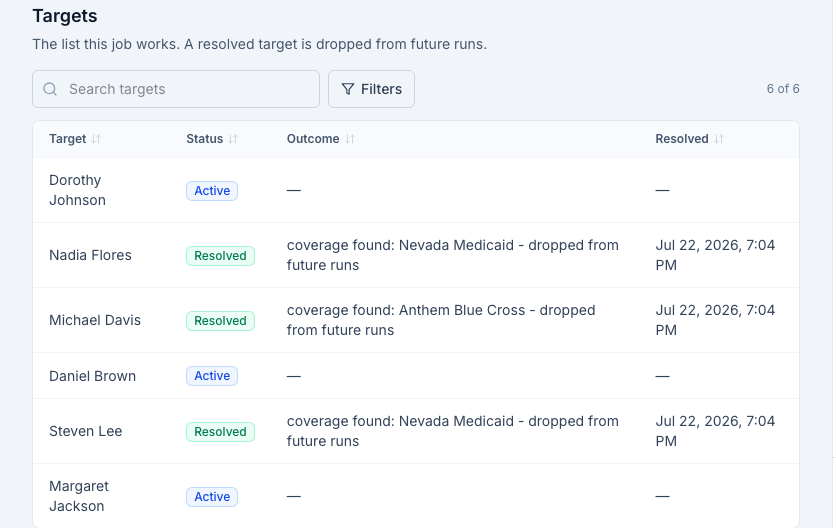
A patient who comes back covered is removed from future runs, so you are never paying to ask the same question about the same person twice.
-
Outcome: three of six patients came back covered, overnight, with dates that reach back to the visit.
Those three become claims you can actually file instead of balances you were about to write off. Illustrative numbers on synthetic patients, but this is the job in its real shape.
Other jobs worth handing over.
Eligibility re-checks
Re-verify a chosen payer for a list of patients on a cadence, so coverage is current before the claim goes out instead of after it comes back.
Monthly statements
Generate patient bills on a schedule, with a minimum-balance rule so you are not mailing a statement for eighty cents.
Emailed reports
The numbers your client practices ask for every month, sent on the first, without anyone building them.
One-off batch actions
Not everything needs a schedule. Select rows, pick an action, confirm once, done. Same guardrails, no recurrence.
Why this matters to the owner
Jobs running on your behalf are the reason a client stays.
A doctor's office does not switch billing companies over a rate card. It switches when nothing is happening. When there are standing jobs recovering coverage every month, statements going out on time, and a report in the inbox on the first, the relationship stops being a line item and starts being infrastructure. That is the whole point: we make the billing company hard to replace.
Questions billers ask
- What is a billing automation, exactly?
- A job you set up once that keeps running on a schedule. You pick the patients or claims on any list, pick what should happen to them, pick how often, and it runs. Coverage discovery, eligibility re-checks, monthly statements, an emailed report on the first of the month. The work happens whether or not anyone remembers to do it.
- How do I stop it from running up a bill?
- Any automation that costs money asks first, at a stated price, and every recurring job carries a monthly budget cap. If a run would cross the cap, the job pauses itself and tells you. Nothing paid ever fires on a job you did not price and approve.
- Does the list keep getting re-checked forever?
- Not for coverage discovery. When a patient turns up covered, they drop off the list, so the target list shrinks every run. You pay for the search that found the money, not for asking the same question about the same patient every month.
- What lands in my inbox?
- A summary email with counts and a link to sign in. Never patient details. Patient information stays inside the application, behind your login, by design.
- Can a job submit a claim on its own?
- No. Automations find things, check things, and prepare things. Sending a claim to a payer is always a person clicking send.
See it on a claim you recognize.
Fifteen minutes, screen shared, your workflow. No contract, no data required to start.
Book a walkthrough