Bill import
Photograph the stack. Get draft claims.
Paper is still how a lot of charges arrive: a superbill, an encounter form, a fax, a phone photo from the practice manager. Somebody types those in. NxtPivot reads the pages, turns them into a review table, and creates drafts only after a person says yes.
- One page with many patients becomes one row per patient
- Re-upload the same stack, get zero duplicates
- Review before anything is created. Nothing auto-sends.
Data entry is not a small tax. It is the whole morning.
Onboarding a new practice usually means somebody typing a backlog of paper into a system, for days, before a single claim goes out. Ongoing, it means a person opening a fax, reading a code, finding the patient, and keying the charge, over and over. That work is slow, it is where transcription errors come from, and it is the reason a new client takes weeks to feel the benefit of switching.
| Step | Typed by hand | With import |
|---|---|---|
| Getting the page in | Open the fax, find the patient, key each field | Upload the stack, all pages at once |
| Many patients on one sheet | Read across the columns, key each line separately | One review row per patient, already split |
| Patients not in the system | Stop, create each one, come back | Create the missing ones in bulk from the review table |
| Pricing | Whatever is written on the form, or looked up | Priced from that practice's fee schedule |
| Scanning the same batch twice | Duplicate claims, found later, if at all | Nothing created twice |
| What exists at the end | Claims, live | Drafts, waiting for your review |
An example, start to finish
A week of superbills from a new practice.
Illustration with made-up numbers. Nothing below is a customer's real data.
- 1
Upload forty pages.
Photographed on a phone at the practice, emailed over, dropped in as one batch. Each page is read and classified: what kind of document is this, and who is on it.
- 2
Get a review table, not a pile of claims.
Forty pages become sixty-three candidate rows, because three of the sheets listed multiple patients. Each row shows the patient it matched, the services read off the page, and anything the reader was not confident about.
- 3
Fix the handful that need it.
Nine patients are new, so create them in bulk from the table. Check coverage for the whole batch in one action. Correct the two rows where the handwriting was ambiguous. Uncheck the one page that turned out to be a fax cover sheet.
- 4
Promote to drafts.
Sixty-two draft claims, each priced from the practice's fee schedule and stamped with the import run it came from. They sit as drafts until a person sends them. If someone re-uploads the same forty pages tomorrow, nothing new is created.
Scenario: a superbill, photographed
One page, four patients, and nobody has to type any of it.
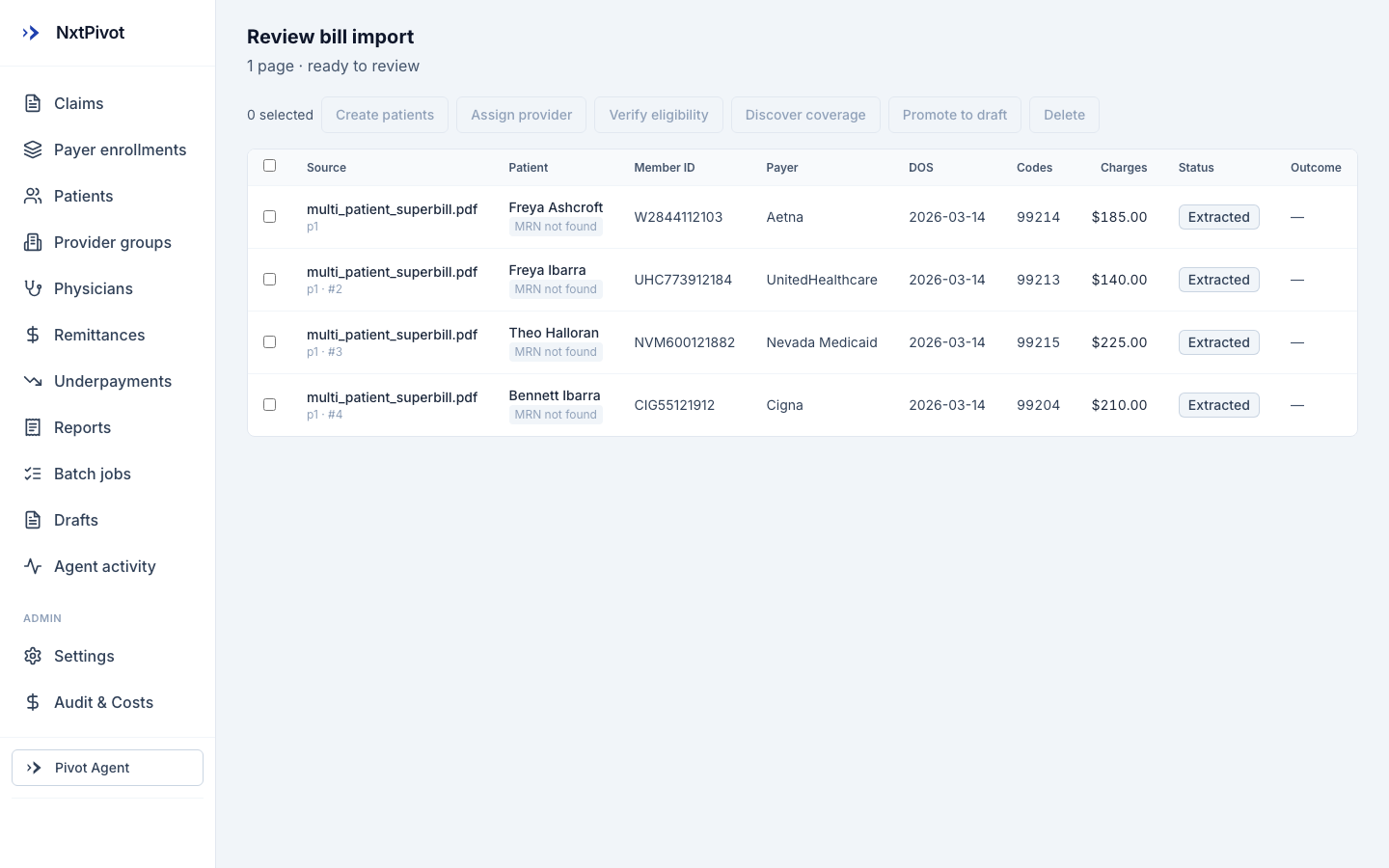
A practice hands you a week of paper. One page is a multi-patient superbill: four encounters, four member IDs, four procedure codes, all in a grid that was designed for a human eye and never for a computer. The old answer is a person, a keyboard, and about four minutes a line.
The reason this is worth automating is not the typing. It is that typed data is where transposed member IDs come from, and a transposed member ID is a denial three weeks later that costs twenty minutes to unwind.
- 1
You photograph the page
A phone picture or a scan. No template to configure, no per-practice mapping to set up first.
- 2
Vanilla reads it as a document, not as text
Our vision extractor pulls the semantic fields, patient, member ID, payer, date of service, code, charge, and keeps each row tied to the page and position it came from.
- 3
Every row lands in a review table
Nothing is created behind your back. Rows arrive as extracted, with what could not be matched called out plainly, like a patient with no MRN on file yet.
- 4
You confirm, and drafts appear
Create the patients, assign the provider, promote to draft claims. The biller is reviewing four rows instead of typing twenty-four fields.
-
Outcome: a page of paper becomes four reviewed draft claims.
Illustrative: on a 40-page backlog this shape of import produced 63 review rows and 62 drafts, with the one exception surfaced rather than guessed at. Made-up numbers, real workflow.
Scenario: the checks that run before it leaves
The cheapest denial is the one that never gets filed.
A denial costs twice. Once when the payer refuses it, and again when somebody spends twenty minutes working out why. Most of the common ones are knowable before the claim goes out: coverage that lapsed, a member ID that no longer matches, a patient who is not on file with that payer at all.
Checking every claim by hand is not realistic, so in practice checking happens on the claims someone had a bad feeling about. Which means the quiet ones go out broken.
- 1
Pearl scrubs the draft before submission
A pre-flight pass over the claim: required fields, code and modifier consistency, payer-specific formatting. Errors are caught while the claim is still yours to fix.
- 2
Eligibility is verified against the payer
Not a guess from your own records. A real check, so you learn now that the coverage is inactive rather than in a denial three weeks from now.
- 3
Every check shows its work
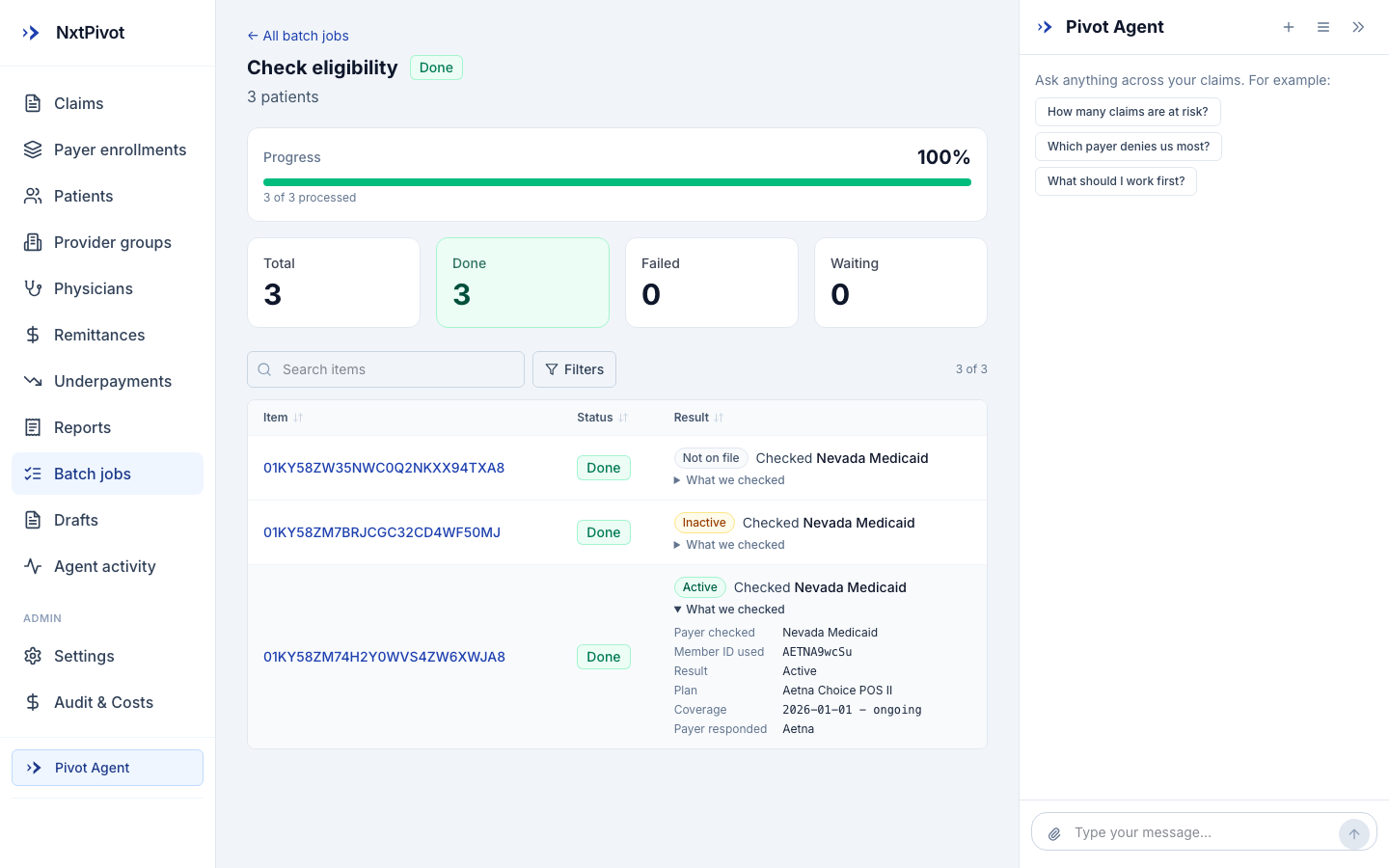
Open "What we checked" and you see the payer contacted, the member ID used, the plan that came back and the coverage window. No verdict without evidence.
- 4
Anything unclear stops and asks
A check that cannot be completed is reported as not completed. It does not get rounded up to a pass to keep a queue moving.
-
Outcome: three patients checked, three known answers, before a claim goes out.
Active, inactive, and not on file are all useful results. The inactive one saves a denial; the not-on-file one starts a coverage hunt. What you never get is a confident answer nobody can trace.
Why this matters to the owner
It changes what you can say yes to.
If taking on a practice means a week of typing, you turn down the messy ones, and the messy ones are usually the ones nobody else wants either. When the backlog is a stack you photograph, onboarding stops being the reason to say no. The doctor sees claims moving in days instead of weeks, and that first impression is most of the relationship.
Questions billers ask
- What can I actually upload?
- A photograph or a scan of the paperwork you already get: superbills, encounter forms, charge tickets, a stack of them at once. If a person can read it, the reader has a fair shot at it, and anything it is unsure about is marked for you rather than guessed at.
- One page lists six patients. Does that work?
- Yes. A single sheet listing many patients becomes a review table with one row per patient, not one lump. That is the case that breaks most scanning tools and it is the one that shows up most in practice.
- What if I upload the same stack twice?
- Nothing is created twice. Each page is fingerprinted on the way in, so a re-upload of pages already imported produces zero duplicates. Re-scanning a batch because you were not sure it worked is safe.
- Does anything get sent to a payer automatically?
- No. Import produces drafts. A person reviews the review table, accepts what is right, fixes what is not, and clicks send. Nothing skips that step.
- Do the prices come across from the paper?
- The codes come from the page. The prices come from your fee schedule for that practice, so imported charges are priced the way you price everything else, not the way somebody wrote it on a form.
- Can I tell later which claims came from a scan?
- Every claim records how it was created: by hand, from charges, by the assistant, from a scan, or from an import run. That record cannot be edited. Filter the claims list by source any time.
See it on a claim you recognize.
Fifteen minutes, screen shared, your workflow. No contract, no data required to start.
Book a walkthrough